Areas allows group in a logically way the different categories and products of the ecommerce. They are managed in the BackOffice.
By default, there are two defined areas: Categories and Brands.
Categories will include all products divided into groups. These, as well, can be divided into sub-categories, depending on the needs of product classification.
Under Brands we have the products of the same brand. It is possible to create several areas, as, for example, for products in the homepage.
We can create an area clicking on the top button "NEW AREA". We must fill in the fields of all tabs. In case that we are forgetting a compulsory field, LogiCommerce will not let us save changes until that particular field is not filled in.
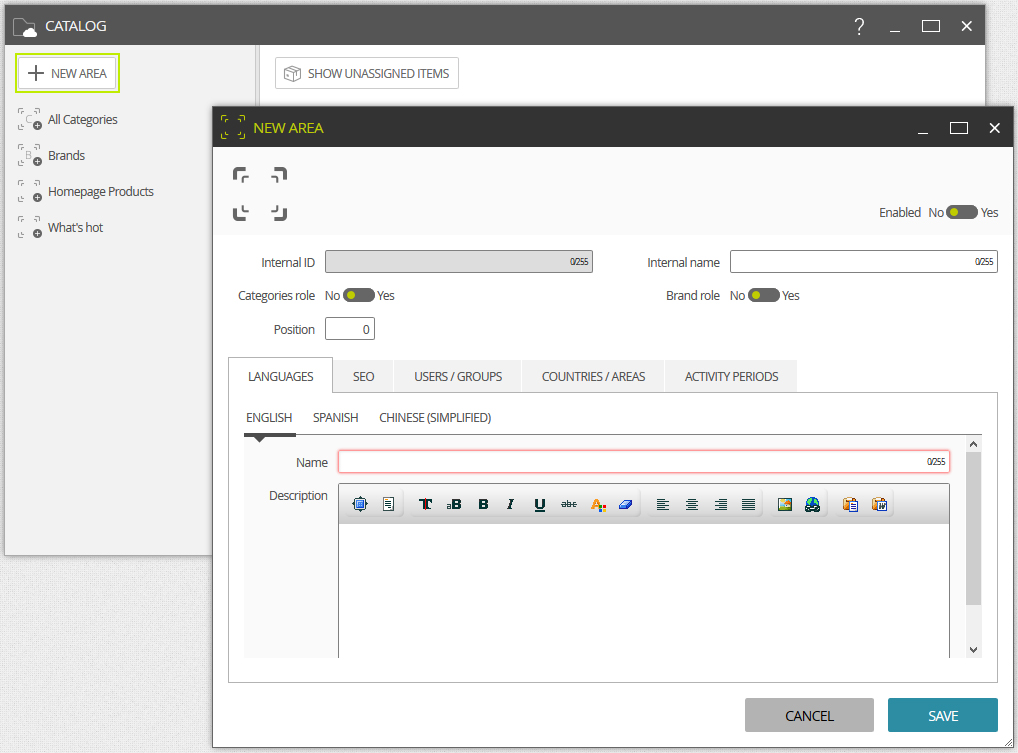
Internal ID
Unique identifier which unambiguosly distinguishes one element from another. It is useful in automatic integration processes. Not shown in the FrontOffice.
Internal name
It represents a name for internal purposses only. Not shown in FrontOffice.
Categories role
By enabling the categories role, all the categories and products contained in this area will be loaded and displayed by default in the FrontOffice.
Brand role
By enabling the brands role, all the categories in this area will make up the brands list available in the brands selector area in the BackOffice. It will also allow you to associate a product with a brand. These are also the brands which the advanced FrontOffice filters will display.
Position
A whole and unique number used for positioning purposses at the FrontOffice.
In addition to these values, it is necessary to add for each active language in the ecommerce:
Name
A name to be displayed in the FrontOffice.
Description
Complementary text to the name which may be displayed at the FrontOffice.