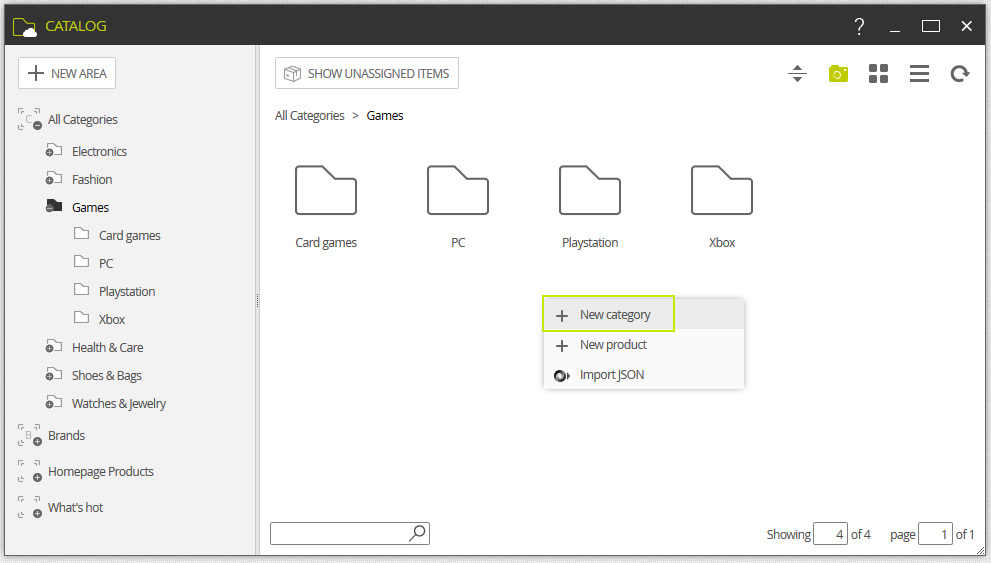
Each area can have as many categories as we need, although in general it is recommended not to have more than 10 for their visual impact in the ecommerce. We can create categories going to the contextual menu doing a right-click on the mouse.
Selecting an area, its content is displayed on the right side. Right clicking on this surface, a contextual menu is displayed, and we can select create a new category or product. It is available as well the Import Json option, which allows importing the structure of categories, subcategories and products in JSON format.
When were create categories, is important to know the following terms:
Enabled
Enable or disable the category. To be visible at the FrontOffice, it must be activated.
Featured product
Enable or disable the Featured Product characteristic of this category.
Special offer
Enable or disable the On offer characteristic of this category
Show produts first
Enable if products are to be shown before subcategories in the FrontOffice.
Show products from subcategories
Enable it when products from subcategories must be shown in the frontOffice.
Categories can have sub-categories that let a more precise organization of products when the user searches for them in the ecommerce. The creation of sub-categories is similar to the creation of categories, but we need to be inside the category at that moment to create them.
 The way we categorize our products is an essential process of ecommerce. A vague or incoherent categorization will make it difficult for the users to find the products. As well, an over-categorization will make it difficult too for them to find the products, as they have to go over too many steps.
 The use in the FrontOffice of tools like filters, recommenders or intelligent searchers will help the user get the product he needs.