To open a new ticket, click on the SUPPORT option that you will find in the lower right corner of the menu of LogiCommerce 8X.
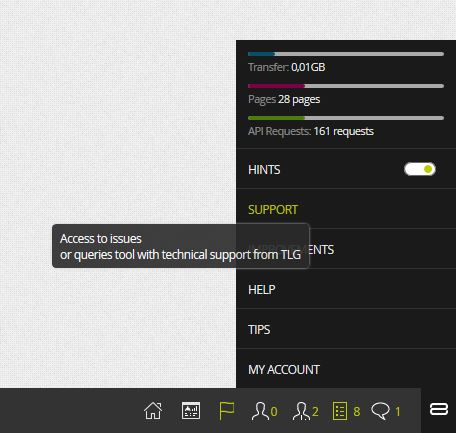
LogiCommerce will redirect you to the help and ticketing platform of TLG Commerce. Once there, you must Send a request and fill in the form that appears in the image below.
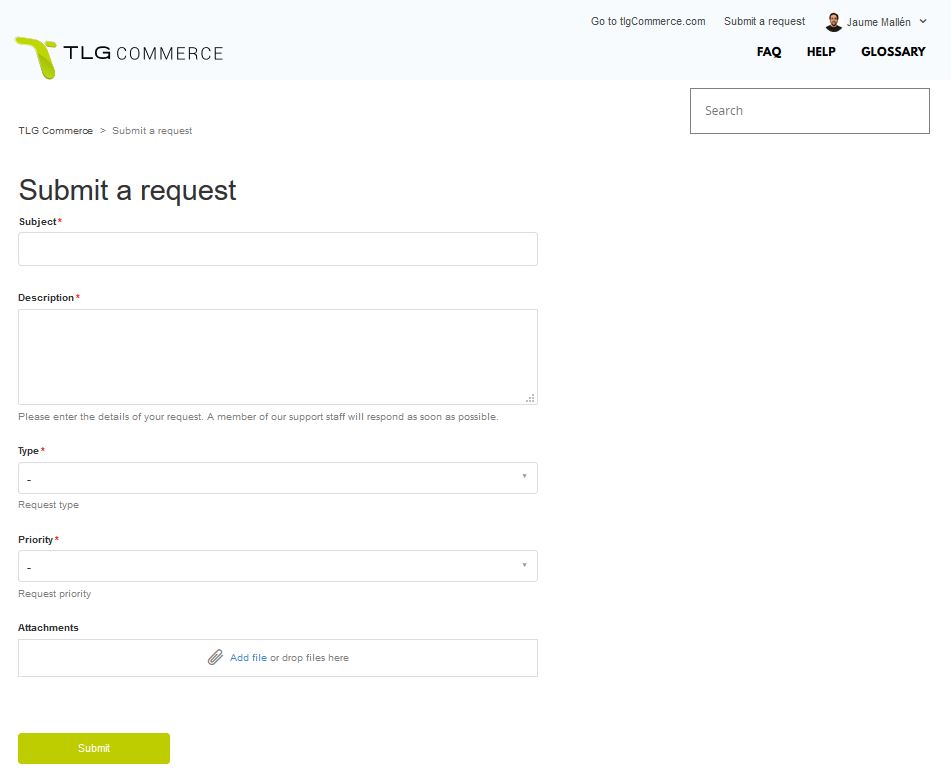
All the fields in the form are mandatory, except for the Attachments.
Below we give detailed information about how to fill in each field of the form:
Subject
A sentence showing the reason of the enquiry or the problem that our eCommerce encounters.
Description
Detailed description of the problem or enquiry.
Type
Select the type of request. It can be a question, an incident or a task related with your eCommerce that must be performed by the support team (registering a new service, changing the appearance of some parts of your eCommerce…).
Priority
Indicate the urgency of the request: Urgent, High, Normal or Low. For more information on the criteria followed by TLG when identifying the priority, refer to the following article: What criteria will we follow when choosing the priority of a ticket?
Attachments
If necessary, you can provide a documentary or graphic proof of a problem or provide additional information so that the support team can carry out the necessary tasks/ammendments.